


A practical answer for cabinet professionals
AT&T phone not ringing after call forwarding?
AnswerCraft works with every mobile carrier and subcarrier. If your showroom calls go straight to voicemail, watch a real AT&T call and see how conditional call forwarding sends only unanswered calls to AnswerCraft.
How to set up business voicemail on your AT&T line
If your showroom phone stops ringing after you turn on forwarding, check whether every call is being sent away. With AT&T conditional call forwarding, you can answer a homeowner yourself and send an unanswered call to your AnswerCraft greeting.
- Check which calls are being forwarded. On iPhone, open Settings → Apps → Phone → Call Forwarding, if available. On a dual-SIM phone, check your AT&T business line. If you previously enabled forwarding for every call and want the phone to ring, turn that setting off. Apple’s iPhone guide
- Activate missed-call forwarding in AnswerCraft. After signup, download the iPhone app and sign in with the login from your welcome email. Choose your AT&T plan in Setup. On iPhone, turn off Live Voicemail as shown in the walkthrough and confirm in the app. Select your greeting, tap Activate AnswerCraft, and confirm the prompts. The app handles the forwarding codes.
- Make two calls from another phone. Call your business number and answer it yourself. Call again, let it ring, and leave a test message. Open AnswerCraft and check the message and notification. If AT&T voicemail still picks up or your phone skips ringing, ask AnswerCraft for setup help.
Watch a real AT&T call and the forwarding fix
0:31 · Hear the real call 1:32 · See AT&T activation. Full app tutorial
Business voicemail for a personal design callback
For a brief human intake call, set your business voicemail greeting to ask for a name, callback number and the room they want to remodel. Call back yourself to talk dimensions, finishes and budget. Prefer to collect those basics first? Choose brief AI intake in AnswerCraft.
New to AnswerCraft? Start here.
- Step 1Select a planCompare call minutes and pricing.
- Step 2Sign up on the websiteChoose a paid plan or start the trial if eligible.
- Step 3Download the iPhone appOpen the App Store
- Step 4Log in and activateUse your welcome email to finish setup in the app.
Built around the way the trades actually work
A cabinet project does not pause for an incoming call.
A cabinet professional may be measuring a custom kitchen , reviewing plans, coordinating installers, unloading cabinetry or discussing selections with a homeowner. An interior designer may be presenting finishes, while a realtor is walking a property with a client.
The call arriving at that moment may be a new kitchen, a contractor needing RTA cabinetry , or a customer ready to move forward. AnswerCraft provides another way to receive that caller professionally without forcing the person doing the work to abandon the task in front of them.
- Give callers a professional response when you cannot answer personally.
- Collect useful information before you return the call.
- Separate promising opportunities from interruptions that can wait.

From ringing phone to organized follow-up
Return the call with context—not a mystery number.
AnswerCraft can capture the caller’s name, phone number, location and reason for calling. Saved messages may include structured call notes, the conversation record and audio playback, giving the business owner a more informed place to begin.
Simple choices. Useful outcomes.
More capable than ordinary voicemail—without pretending to replace you.
Your judgment, product knowledge and personal follow-up still close the job. Whether the caller needs help comparing cabinet collections or understanding the process through our cabinet buying guide , AnswerCraft is meant to protect the beginning of that opportunity and give you useful information for the next conversation.
Choose a mode
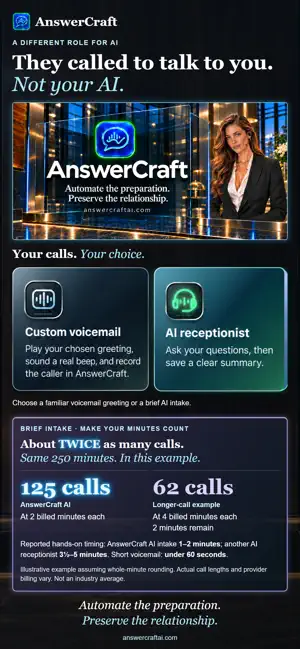
Use a custom voicemail experience or an AI receptionist, depending on what fits the business and the way its callers should be handled.
Shape the welcome
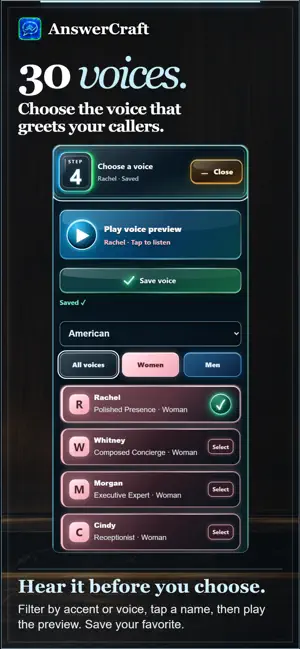
Select a professional voice and create a greeting that sounds appropriate for the company instead of settling for a generic carrier message.
Follow up informed
Review what the caller needs, listen when appropriate and decide which opportunity deserves attention first.

Why MDI Luxury Cabinetry is sharing it
We understand what one unanswered opportunity can mean.
Cabinetry connects homeowners, kitchen designers, interior designers, realtors, remodeling contractors, installers, suppliers and multiple trades. The same coordination continues through projects such as custom closets . We know how quickly a working day becomes a chain of measurements, decisions, property visits, deliveries and jobsite questions.
That experience is why MDI Luxury Cabinetry uses AnswerCraft for missed calls. The idea is practical: when your hands are full, the caller should still receive a useful response and you should have a better starting point when you call back.
“One missed call can be a missed kitchen, a missed project or the paycheck that would have come from the next job.”
MDI Luxury CabinetrySee what happens to a missed call
At MDI Luxury Cabinetry, we use AnswerCraft when we’re measuring a kitchen or reviewing finishes with a client. Watch the AT&T handoff, then see what the installer or designer has in hand before calling back.
Hear a real AT&T call
Listen as the AT&T phone rings and the unanswered call passes to AnswerCraft. Watch on YouTube
Watch a contractor’s missed-call workflow
See how a contractor can collect the job details and return the call personally. Watch on YouTube
What AnswerCraft includes
- AT&T Personal and Business Wireless
- Answer an incoming call yourself or let an unanswered call go to AnswerCraft. The app guides activation. AnswerCraft works with every mobile carrier and subcarrier. Choose your provider in the app and follow the forwarding instructions for your line. The video shows AT&T conditional call forwarding on a direct AT&T line.
- Two ways to answer
- Choose a custom voicemail greeting or a brief AI receptionist that asks the four to six questions you select. Pick from 30 voices.
- English and Spanish
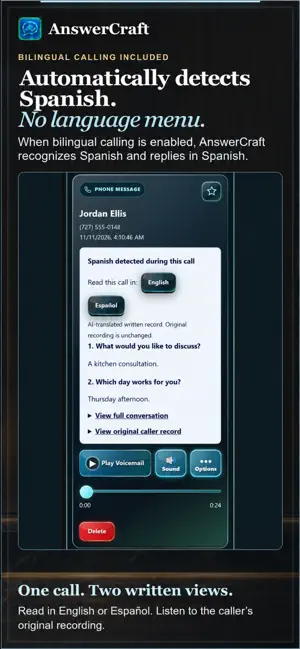
- When bilingual answering is enabled, callers can speak Spanish naturally. Read the message in English or Spanish and listen to the original audio.
- Saved messages and alerts
- Get a push notification, read the caller’s details and transcript, or play the recording before you call back. Natural spam screening can cut down on interruptions.
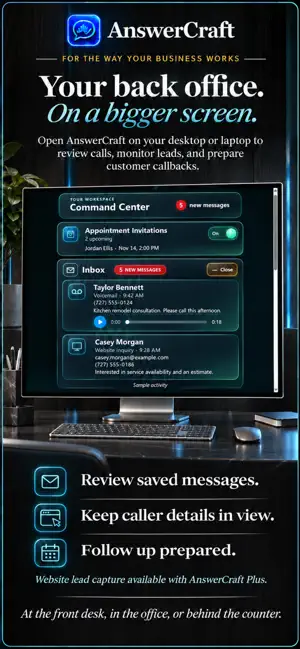
- Shared Back Office
- A teammate can review voicemail, calls, appointments and website inquiries on a desktop and return calls while you are with a client.
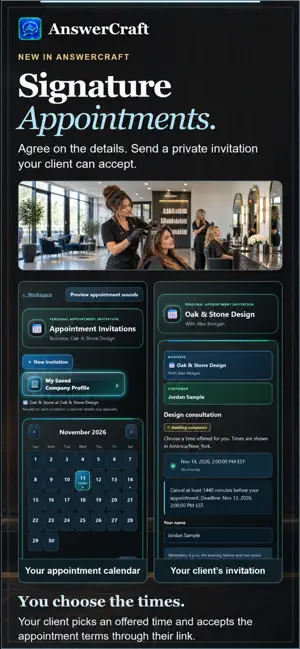
- Appointment confirmations and reminders for showroom visits
- With Signature Appointments, agree on a time with your customer, then send a private invitation with an optional fee and your cancellation terms. For a showroom visit or a field measure, the customer can accept the invitation without an account. Reminders go out at 6 p.m. the evening before and two hours before the appointment. Cancellations trigger an alert. Watch a customer accept an invitation.
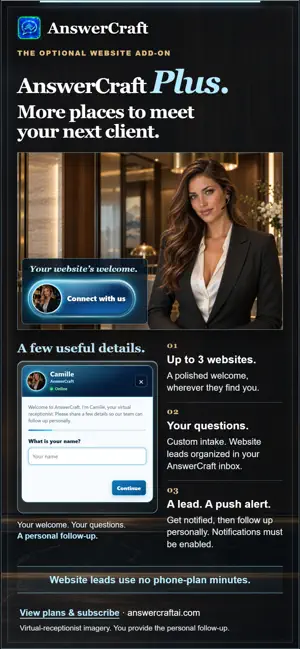
- Website lead capture widgets for cabinet shops
- AnswerCraft Plus sends website inquiries to your phone. The optional add-on includes three website intake widgets. Use them across three sites or in different places on one. A shop can use one for a design consultation, another for cabinet parts and a third for installer inquiries. Website leads show their source and use no phone minutes. See a vanity inquiry become a phone notification.
- Priority callbacks for care services
- With the care shortcut enabled, callers can press 9 to request a priority callback. The care professional receives a discreet alert and decides when to respond.
Website leads, shared messages and appointment invitations
Try AnswerCraft
for 10 days.
Give callers a personal welcome while you’re with a client. Get the project details in English or Spanish, then call back when you’re ready.
Start my 10-day trialUp to 20 free call minutes. Card required. New accounts only.
Choose your Black Friday planChoose your plan
Choose a plan to sign up on AnswerCraft. When your number is ready, AnswerCraft will email your login so you can finish setup in the app.
Enroll by November 30, 2026 at 11:59 p.m. Eastern.
Choose the minutes that fit your business.
150 minutes
Regular price $49.99/month
Save $60 over 12 payments
Regular monthly price
60 minutes
For occasional missed calls.
Regular price $29.99/month
Save $36 over 12 payments
Regular monthly price
100 minutes
For a growing callback list.
Regular price $39.99/month
Save $48 over 12 payments
Regular monthly price
Every plan includes brief personalized intake, English/Spanish answering, and organized messages and recordings.
Compare plans from 250 to 1,000 minutes
Black Friday offer terms
New subscribers who enroll November 15–30, 2026, by November 30 at 11:59 p.m. Eastern, save 10% on their base plan for the first 12 monthly payments. The regular monthly price applies afterward. The optional Plus add-on is $19.99/month. Additional paid minutes are $0.35 each.
Answering pauses at 20 trial minutes. Cancel before day 10 to avoid the first payment. AnswerCraft handles subscription billing. MDI coupons apply only to cabinetry, cabinet accessories and related MDI purchases.